


Fotor–AI Photo Editor & Filter
4.320.32K Reviews
App Specs
- Version
- 8.2.11.2
- Updated On
- License
- Free
- Downloads
- 10,000,000+
- Developer
- AI Art Photo Editor | Everimaging Ltd.
- Categories
- Photography
- Platform
- Android, iOS
Screenshots



 Analysis by AppCompare
I like having one place to take a photo from “almost there” to ready to share, and that is the appeal of Fotor–AI Photo Editor&Enhancer. It is a photography app from AI Art Photo Editor | Everimaging Ltd., with a mix of familiar adjustments and AI-led tools. My overall impression is that it aims to make editing approachable, while offering enough variety for people who want to go beyond a quick crop or filter.
What the free starting point means
Fotor is free to download, so you can try its editing approach without paying up front. That is useful if you are still deciding whether you want a dedicated editor or only need occasional fixes. The app also has in-app purchases ranging from $0.99 to $459.99 per item, so I would check the price shown for a particular purchase before committing. Those figures describe a broad range of available purchases, not a promise that every tool requires payment or that one specific option costs a particular amount.
Its popularity suggests that many people have found a reason to keep it around: it has an average rating of 4.3 from around 731,000 ratings, with over 10 million installs. It is rated Teen, and the current version is 8.1.7.4, with Android 7.0 as the minimum operating-system requirement. It was released on March 29, 2013, giving it a long history as a mobile photo editor. I would still judge it by whether its tools fit my own habits, rather than treating popularity as proof that it will suit every photographer.
Where the value shows up in a normal workflow
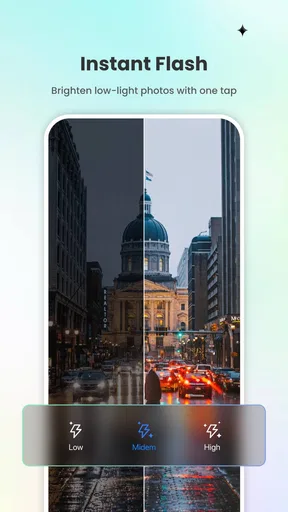
The strongest value is convenience. Instead of opening one app to brighten a dim photo, another to make a collage, and a third to retouch a portrait, Fotor brings several kinds of editing into one place. That can save small amounts of time across a week of casual edits. The payoff is less about replacing every specialist tool and more about keeping routine work simple.
For example, if I took a quick picture of a friend in mixed indoor light, I could start with the one-tap enhancement, compare it with the original, and then make a restrained brightness or color adjustment if the result felt too strong. For a portrait, I would use retouching lightly rather than removing every natural detail. That order matters: a broad automatic adjustment first, followed by a small manual correction, can look more believable than stacking several effects at once.
Filters and collage tools add a different kind of value. Filters help establish a consistent mood when a photo feels flat, while a collage can turn several separate snapshots into a compact recap of a day out. If I am preparing a quick social post, that combination is more convenient than exporting images between multiple editors. If I am correcting a photograph for a print or a professional client, I would want more control and would not assume a mobile preset is enough.
First Impressions
Jumping into Fotor–AI Photo Editor&Enhancer, the first thing that struck me was the clean and intuitive interface. Everything is laid out in a way that even the most tech-challenged among us can navigate with ease. It’s not just another photo editing app; it’s a powerhouse packed into a sleek design.
Worth Reading Before You Choose

Flipboard Shows What News Apps Must Do Beyond the Feed

Switching to Android Auto Means Rethinking Your Driving Routine

Google Calendar Makes a Crowded Week Easier to Manage

Ludo King Makes the Most of the Minutes Between Plans

Baby Panda World Brings Quick Play to Modern Phones, but Its Game Library Feels Busy

ESPN’s Live Game View Makes Following Close Games Easier
The app opens up with a home screen that offers a quick overview of its main features. You can dive straight into editing by selecting a photo from your gallery or explore the various tools it offers. And let me tell you, there are plenty to choose from!
Features That Stand Out
Let’s talk features, because this is where Fotor really shines. The app boasts a wide array of tools that cater to both beginners and seasoned photo editors. Here are a few highlights:
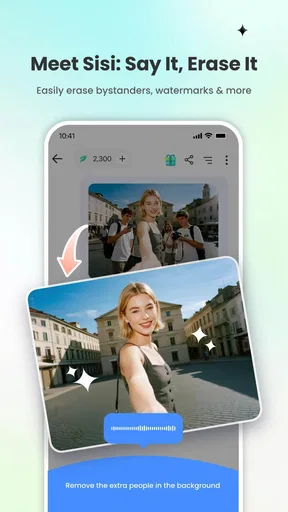
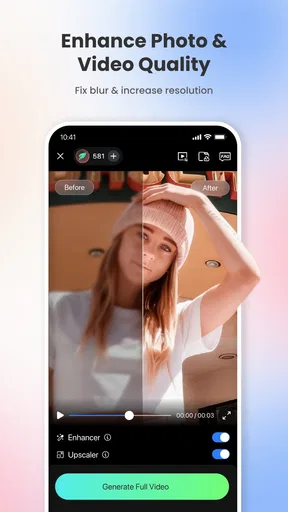
- AI Enhancements: With just one tap, you can enhance your photos using AI technology. It adjusts lighting, sharpness, and colors to give your images a professional touch.
- Basic Editing Tools: Crop, rotate, adjust brightness, contrast, and saturation. The basics are there, but they’re executed flawlessly.
- Advanced Filters: Whether you’re going for a vintage look or something more modern, the filters in Fotor are top-notch.
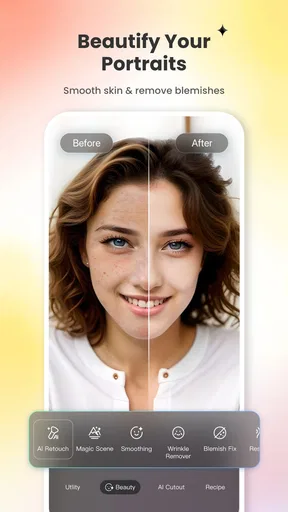
- Retouching: This feature lets you fine-tune portraits with tools like blemish removal and teeth whitening. Say goodbye to imperfections!
- Collage Maker: For those who love storytelling through photos, the collage maker is a fun way to combine your best shots.
Choosing between automatic edits and manual control
In practice, I would treat the AI result as a starting suggestion, not a finished answer. Automatic brightening and sharpening can help a soft or dull image, but they may also push a low-light picture toward an overly crisp or saturated look. I get a more natural result by checking skin tones and bright areas after the enhancement, then easing back with the basic controls if needed. The original image is a useful reference, especially when an edit looks impressive on a bright phone screen but less convincing at normal size.
There is also a practical reason not to apply every tool in sequence: each extra adjustment can pull the image further from the scene I remember. For a photo of food, I might favor a small color lift; for a sunset, I would avoid boosting saturation automatically if the sky already carries strong color. Portrait retouching deserves the same restraint. A little cleanup can help a casual profile picture, while heavy blemish removal or whitening can make a familiar face look unlike itself.
People often wonder whether a one-tap editor can handle a batch of photos consistently. I would use it image by image when the lighting or subject changes, rather than assume one treatment will work equally well across a whole album. A filter that suits an outdoor shot may muddy an indoor one. For a set meant to look coherent, I would choose one visual direction first and make small, individual corrections instead of applying the strongest effect everywhere.
What I Loved
The AI enhancement is undoubtedly one of the strongest features of Fotor–AI Photo Editor&Enhancer. It’s impressive how a single tap can transform a dull photo into something vibrant and eye-catching. The filters also deserve a special mention. They’re not your run-of-the-mill presets; they genuinely add a unique flair to photos.
I also appreciated the retouching tools. They’re easy to use and incredibly effective. It’s like having a personal glam squad on standby to ensure you look your best in every shot.
How it fits alongside other photo editors
Compared with a phone’s built-in editor, Fotor is appealing when I want more than a quick crop, rotation, or basic light correction. The built-in option is often the faster choice for a tiny fix, especially if I do not want to explore extra menus. Fotor makes more sense when I want to try a filter, retouch a portrait, or combine images without switching apps.
Against specialist editing software, the trade-off is different. A dedicated editor may be preferable when precise control, repeatable professional adjustments, or a carefully managed workflow matters more than convenience. Fotor’s breadth is useful for everyday creativity, but a large selection of tools can make it harder to settle on a subtle result. I would choose it for a quick social image or a personal collage, not as my only option for demanding commercial work.
A realistic use case is sorting photos after a family gathering. I could pick one strong group shot, crop out distracting space, make a mild lighting correction, and use a collage for a few extra moments that do not need individual treatment. The useful tip is to decide what each image is for before editing: a single portrait benefits from careful retouching, while a collage usually needs consistent framing more than elaborate effects. That keeps the process focused and avoids spending time polishing details that will be tiny in the final layout.
Room for Improvement
While Fotor is packed with features, there’s always room for improvement. Some users might find the app a bit overwhelming at first due to the sheer number of options available. A guided tutorial on first launch could be beneficial for newbies.
Additionally, while the free version is robust, some of the more advanced tools are locked behind a premium subscription. It’s worth the investment if you’re serious about photo editing, but it might not be necessary for everyone.
Who is likely to get the most out of it?
I think Fotor is a good fit for casual photographers, people who regularly prepare images for social media, and anyone who wants a practical set of portrait and collage tools on a phone. It is especially useful when the goal is to make a decent photo clearer or more polished without learning a complicated editing workflow. Someone who edits only once in a while can start with the free download and see whether the everyday tools are enough before considering a purchase.
I would be more cautious if I mainly want a simple, distraction-free editor. The breadth that helps one person can feel like clutter to someone who only crops pictures. It is also not the best match if my priority is highly controlled, professional image work, or if I do not want to encounter optional paid items while exploring. Since purchase prices vary widely, I would make a specific decision based on the tool I actually need rather than paying simply because the app has many features.
One helpful habit is to edit a copy or keep the unedited original available, particularly before trying a strong filter or portrait correction. That makes it easier to compare versions and choose the one that still looks like the moment. I would also finish with a quick check at ordinary viewing size: small details that seem important while zoomed in may not matter in a shared image, while an overly bright face or artificial color will still stand out.
Final Thoughts
In a world where visuals speak louder than words, having a powerful photo editing app like Fotor in your arsenal is a must. Its combination of advanced features and user-friendly design makes it a staple for anyone who loves photography or simply wants to up their social media game.
Whether you’re a casual snapper or a budding influencer, Fotor has something for everyone. It’s not just about making your photos look good; it’s about making them pop and stand out. So go ahead, give it a try, and watch your photos transform into masterpieces!
My verdict is positive, with a clear limit: this is most valuable when I want several approachable editing options in one mobile app, not when I need every adjustment to be exact. The free starting point makes trying it reasonable, while the range of optional purchases means I would pause and check the cost of a tool before buying. If you enjoy experimenting with portraits, filters, and collages, it is worth exploring. If your edits are rare or your standards demand specialist control, your phone’s basic editor or a dedicated professional alternative may be the better fit.
Pros
- Intuitive interface for easy editing.
- Wide range of filters and effects.
- AI tools enhance photos quickly.
- Batch processing saves time.
- Supports multiple file formats.
Cons
- In-app purchases can be costly.
- Some features require internet.
- Limited free version capabilities.
- Occasional ads in free version.
- Learning curve for advanced tools.
FAQs for Fotor–AI Photo Editor & Filter
What features does Fotor–AI Photo Editor & Enhancer offer?
Fotor provides a wide range of features including AI-driven photo enhancement, portrait retouching, and a variety of filters and effects. Users can also access advanced editing tools like background removal, collage maker, and design templates for social media. The app is designed for both beginners and professional photographers seeking quick and effective photo edits.
Is Fotor–AI Photo Editor & Enhancer free to use?
Fotor offers a free version with basic features and editing tools. However, to access premium features like advanced filters, high-quality export options, and ad-free usage, users need to subscribe to a paid plan. The subscription enhances the overall experience, making it suitable for more intensive photo editing tasks.
How does the AI technology in Fotor enhance photos?
Fotor’s AI technology automatically analyzes and enhances photos by adjusting brightness, contrast, and saturation to achieve the best possible visual outcome. The AI feature also helps in portrait retouching, making it ideal for users who want quick and efficient edits without manual adjustments. This technology simplifies the editing process while maintaining high-quality results.
Can Fotor–AI Photo Editor & Enhancer be used offline?
Fotor requires an internet connection for initial download and accessing certain features, especially those involving cloud services. However, many of its editing tools can be used offline once the app is installed. Users should be aware that some advanced features and updates may require a connection to function properly.
Is Fotor–AI Photo Editor & Enhancer suitable for professional use?
Yes, Fotor is suitable for professional use, thanks to its comprehensive suite of editing tools and high-quality output capabilities. While it is user-friendly for beginners, professionals will appreciate the advanced features, including RAW file processing and batch processing, which streamline workflow and enhance productivity for serious photography projects.


